



The USGS produces postfire debris-flow hazard assessments for recently burned areas, estimating likelihood, volume, and combined hazard for a variety of rainfall scenarios. They also define rainfall thresholds needed to trigger debris flows at specific probability levels. This page provides methods to access data from these assessments.
Data Archive
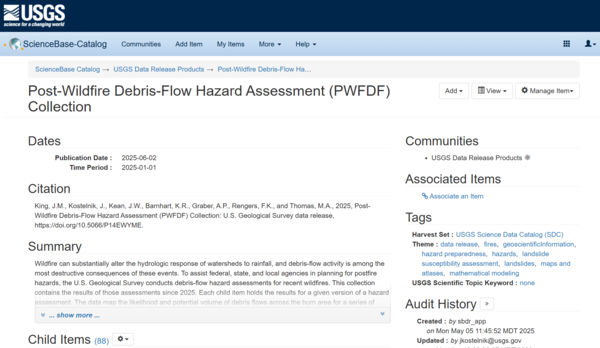
The Post-Wildfire Debris-Flow Hazard Assessment (PWFDF) Collection archives all postfire debris-flow hazard assessments produced since 2025. This collection is hosted on the USGS’s ScienceBase data catalog, and all assessments in the collection conform to a strict data specification. Assessment datasets are organized as child items, with one child item for each version of a given hazard assessment. Each child item holds the data files for the relevant assessment version, and these files are discussed in detail in the data specification. Users can obtain data from the PWFDF collection by navigating through the user interface, or by using programmatic APIs, which are discussed below.
Data Specification
Assessments produced since 2025 conform to a strict data specification, which can be found here: Hazard Assessment Data Specification
Legacy Assessments
Hazard assessments produced before 2025 are also archived on ScienceBase. These assessments do not have data specifications, but their data files and metadata are discussed on the relevant ScienceBase pages.
Hazard assessments produced in 2024 are available in the 2024 assessment archive. This archive is organized such that each child item holds the data files for a given hazard assessment.
Hazard assessments produced before 2024 are available in the 2013 – 2023 assessment archive. In this archive, each child item corresponds to a particular year. Within a year, the data files for different assessments are provided as a set of zip archives.
Programmatic Access
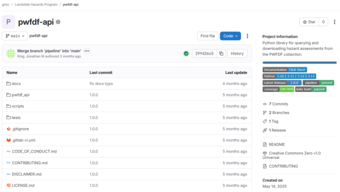
Software developers can use the PWFDF API to programmatically access data from the PWFDF Collection. The API provides command line and Python interfaces to search, query, and download assessments from the PWFDF collection. You can find documentation for the API here: PWFDF API Documentation. Note that the API only accesses data from the PWFDF collection – it does not provide access to the legacy assessments produced between 2013-2024.
GIS professionals can use the PWFDF feature service to query and stream assessment data for GIS applications. Please note that the feature service only contains a subset of the data for a given assessment. For complete datasets, you should access data using either the ScienceBase archive, or via the PWFDF API.
Additional Resources
Web Dashboard
The PWFDF dashboard is an interactive map that allows users to view and filter hazard assessments without needing to manage data. The dashboard is primarily intended for viewing assessments, but interested users can also find data download links for specific assessments by clicking on the assessment and inspecting its summary tab. Note that the dashboard only provides links to the most recent version of a given assessment.
Software Packages
Software developers can find the code used to produce the PWFDF collection on the software page.
The USGS produces postfire debris-flow hazard assessments for recently burned areas, estimating likelihood, volume, and combined hazard for a variety of rainfall scenarios. They also define rainfall thresholds needed to trigger debris flows at specific probability levels. This page provides methods to access data from these assessments.
Data Archive
The Post-Wildfire Debris-Flow Hazard Assessment (PWFDF) Collection archives all postfire debris-flow hazard assessments produced since 2025. This collection is hosted on the USGS’s ScienceBase data catalog, and all assessments in the collection conform to a strict data specification. Assessment datasets are organized as child items, with one child item for each version of a given hazard assessment. Each child item holds the data files for the relevant assessment version, and these files are discussed in detail in the data specification. Users can obtain data from the PWFDF collection by navigating through the user interface, or by using programmatic APIs, which are discussed below.
Data Specification
Assessments produced since 2025 conform to a strict data specification, which can be found here: Hazard Assessment Data Specification
Legacy Assessments
Hazard assessments produced before 2025 are also archived on ScienceBase. These assessments do not have data specifications, but their data files and metadata are discussed on the relevant ScienceBase pages.
Hazard assessments produced in 2024 are available in the 2024 assessment archive. This archive is organized such that each child item holds the data files for a given hazard assessment.
Hazard assessments produced before 2024 are available in the 2013 – 2023 assessment archive. In this archive, each child item corresponds to a particular year. Within a year, the data files for different assessments are provided as a set of zip archives.
Programmatic Access
Software developers can use the PWFDF API to programmatically access data from the PWFDF Collection. The API provides command line and Python interfaces to search, query, and download assessments from the PWFDF collection. You can find documentation for the API here: PWFDF API Documentation. Note that the API only accesses data from the PWFDF collection – it does not provide access to the legacy assessments produced between 2013-2024.
GIS professionals can use the PWFDF feature service to query and stream assessment data for GIS applications. Please note that the feature service only contains a subset of the data for a given assessment. For complete datasets, you should access data using either the ScienceBase archive, or via the PWFDF API.
Additional Resources
Web Dashboard
The PWFDF dashboard is an interactive map that allows users to view and filter hazard assessments without needing to manage data. The dashboard is primarily intended for viewing assessments, but interested users can also find data download links for specific assessments by clicking on the assessment and inspecting its summary tab. Note that the dashboard only provides links to the most recent version of a given assessment.
Software Packages
Software developers can find the code used to produce the PWFDF collection on the software page.