



CIDR Request Data – Submit Request
CIDR Request Data – Submit Request
The Request Data (link in the Menu bar ) tool provides the option to assist U.S. Federal Civil agencies to enter near-term land remote sensing data requirements and provides an interface to place new Data Acquisition Requests (DARs). There are four sections within Request Data to acquire the desired data. Click information icon for more definitions/information per entry box. (Figure 1)
The requirements for requesting data:
| Required | Optional |
|---|---|
| Active EROS Registration System Account Project Description/Justification Data Use and Sharing Archived Imagery Needed (Y/N) Type of Sensor Type of Product (MSI, PAN, SAR, Other) Acquisition Start Date Acquisition End Date Publicly Viewable DAR (Y/N) Collection Strategy Spatial Information | Spacecraft Processing Level Output Format |
A. Request Details
B. Imaging Requirements
C. Spatial Requirements
D. Submit Request
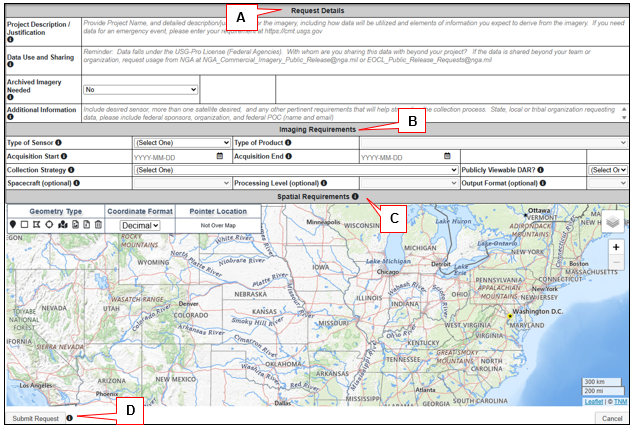
Figure 1: Request Data Tool
D. Submit Request – Select the Submit button in the lower left-hand corner of the screen. A status bar appears indicating that the request was successfully submitted and is awaiting approval (pending).
An automated email is sent to confirm the request and to provide a link to the DAR details. After leaving the CIDR site the request can be edited using the link in the email. DARs can only be edited while in pending status. The DAR can be shared with another emergency responder using the Email DAR Information link. Only one email address can be entered per transaction.
The DAR may be edited prior to approval. If additional Imagery Types are needed for the requirement, a copy of the DAR can be used as a template to create additional data requests.
The user will be able to track the status of the request and receive active notifications from the CIDR tool regarding any changes in the status of the request.
Status Definitions
- Pending – DAR waiting to be approved.
- Approved – DAR meets standard requirements for tasking/requesting data.
- Submitted to Vendor – DAR has been picked up by NCAC to be entered into GIMS.
- Rejected – DAR does not fall withing the standard requirements for tasking/requesting data.
- Cancelled – User – DAR owner decided to cancel request
- Cancelled – Admin – CIDR Admin cancelled the request for a variety of reason. Example: DAR duplication
- Closed – Satisfied -- DAR owner or CIDR Admin closed request because the project acquired desired data.
- Closed – Unsatisfied – DAR Owner or CIDR Admin closed request due to data did not meet projects needs or target window has closed.
CIDR Request Data – Submit Request
The Request Data (link in the Menu bar ) tool provides the option to assist U.S. Federal Civil agencies to enter near-term land remote sensing data requirements and provides an interface to place new Data Acquisition Requests (DARs). There are four sections within Request Data to acquire the desired data. Click information icon for more definitions/information per entry box. (Figure 1)
The requirements for requesting data:
| Required | Optional |
|---|---|
| Active EROS Registration System Account Project Description/Justification Data Use and Sharing Archived Imagery Needed (Y/N) Type of Sensor Type of Product (MSI, PAN, SAR, Other) Acquisition Start Date Acquisition End Date Publicly Viewable DAR (Y/N) Collection Strategy Spatial Information | Spacecraft Processing Level Output Format |
A. Request Details
B. Imaging Requirements
C. Spatial Requirements
D. Submit Request
Figure 1: Request Data Tool
D. Submit Request – Select the Submit button in the lower left-hand corner of the screen. A status bar appears indicating that the request was successfully submitted and is awaiting approval (pending).
An automated email is sent to confirm the request and to provide a link to the DAR details. After leaving the CIDR site the request can be edited using the link in the email. DARs can only be edited while in pending status. The DAR can be shared with another emergency responder using the Email DAR Information link. Only one email address can be entered per transaction.
The DAR may be edited prior to approval. If additional Imagery Types are needed for the requirement, a copy of the DAR can be used as a template to create additional data requests.
The user will be able to track the status of the request and receive active notifications from the CIDR tool regarding any changes in the status of the request.
Status Definitions
- Pending – DAR waiting to be approved.
- Approved – DAR meets standard requirements for tasking/requesting data.
- Submitted to Vendor – DAR has been picked up by NCAC to be entered into GIMS.
- Rejected – DAR does not fall withing the standard requirements for tasking/requesting data.
- Cancelled – User – DAR owner decided to cancel request
- Cancelled – Admin – CIDR Admin cancelled the request for a variety of reason. Example: DAR duplication
- Closed – Satisfied -- DAR owner or CIDR Admin closed request because the project acquired desired data.
- Closed – Unsatisfied – DAR Owner or CIDR Admin closed request due to data did not meet projects needs or target window has closed.