



EROS Registration System (ERS) Password Expiration
The EROS Registration System (ERS) system requires a login with a username and password. The password may have an expiration date assigned. The documentation will explain the process and how a user can reset their expiration date.
EROS Registration System (ERS) Password Expiration Notices and Behaviors
Summary
The ERS system requires a login with a username and password. The password may have an expiration date assigned. The following document will explain the process and how a user can reset their expiration date.
Notices & Behaviors
- ERS registration site: https://ers.cr.usgs.gov/register
- By default, when a user signs up for an ERS account, the expiration date is not set.
- If a user is assigned an expiration date to their account, an email will be sent to indicate the date that was assigned.
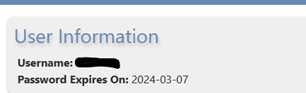
- If a user has an expiration date set to their account, under the user’s Profile tab, the User Information section will provide the expiration date.
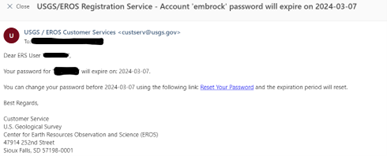
- An email will be sent to a user whose expiration date is going to expire in 30 days.
- If a user has an expiration date, and the user resets their password, the default expiration date will be set to one year from the date of the password reset.
- A new email will be sent to the user indicating the new expiration date.
Contact Us
If you experience any issues or do not understand why you have an expiration date assigned, please contact our customer service at custerv@usgs.gov.
The EROS Registration System (ERS) system requires a login with a username and password. The password may have an expiration date assigned. The documentation will explain the process and how a user can reset their expiration date.
EROS Registration System (ERS) Password Expiration Notices and Behaviors
Summary
The ERS system requires a login with a username and password. The password may have an expiration date assigned. The following document will explain the process and how a user can reset their expiration date.
Notices & Behaviors
- ERS registration site: https://ers.cr.usgs.gov/register
- By default, when a user signs up for an ERS account, the expiration date is not set.
- If a user is assigned an expiration date to their account, an email will be sent to indicate the date that was assigned.
- If a user has an expiration date set to their account, under the user’s Profile tab, the User Information section will provide the expiration date.
- An email will be sent to a user whose expiration date is going to expire in 30 days.
- If a user has an expiration date, and the user resets their password, the default expiration date will be set to one year from the date of the password reset.
- A new email will be sent to the user indicating the new expiration date.
Contact Us
If you experience any issues or do not understand why you have an expiration date assigned, please contact our customer service at custerv@usgs.gov.