



Screenshot of the National Map 3D Viewer showing the elevation profile tool. The screen shot is of the Inyo National Forest area of California, near Tunnabora Peak.
How do I download layers in The National Map Viewer?
Base map data layers in The National Map Viewer are for viewing only. This application is designed for visualizing data, combining different data layers, and creating (and printing) your own maps.
To download data from The National Map, see the link at the top of the Viewer for the Data Downloader. None of the base map layers in the Viewer are available for download, but some of them can be accessed as a map service.
Learn more:
Related

The National Map 3D Viewer, Elevation Profile
Screenshot of the National Map 3D Viewer showing the elevation profile tool. The screen shot is of the Inyo National Forest area of California, near Tunnabora Peak.
The National Map 3D Viewer
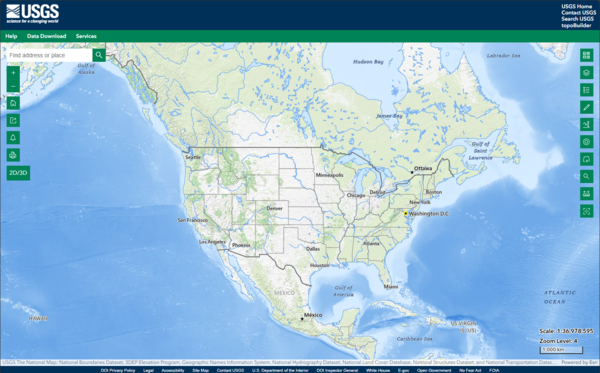
This is a screen shot of the National Map (TNM) 3D Viewer Application. This new application will replace the existing TNM Viewer on or around April 7th 2025
This is a screen shot of the National Map (TNM) 3D Viewer Application. This new application will replace the existing TNM Viewer on or around April 7th 2025

Lesson 3a: The National Map Viewer Interface and Data Content
Lesson 3a: The National Map Viewer Interface and Data ContentLesson 3a: The National Map Viewer Interface and Data Content. In this lesson, we will provide the user with an overview and demonstration of the interface and data content of The National Map Viewer.
Lesson 3a: The National Map Viewer Interface and Data Content
Lesson 3a: The National Map Viewer Interface and Data ContentLesson 3a: The National Map Viewer Interface and Data Content. In this lesson, we will provide the user with an overview and demonstration of the interface and data content of The National Map Viewer.

Are there any costs or restrictions to usage of data downloaded from The National Map? Are there any costs or restrictions to usage of data downloaded from The National Map?
Data from The National Map is free and in the public domain. There are no restrictions on downloaded data; however, we request that the following statement be used when citing, copying, or reprinting data: "Data available from U.S. Geological Survey, National Geospatial Program." Learn more: USGS Copyrights and Credits Statement

How can visually impaired individuals use The National Map viewer or download client? How can visually impaired individuals use The National Map viewer or download client?
The USGS is committed to making its websites accessible to all users in accordance with provisions of Section 508 of the Rehabilitation Act of 1973 (as amended in 1998). Currently, there is no technology capable of producing alternatives to dynamically generated geospatial images in The National Map viewer or download client that are accessible to visually impaired individuals, so compliance with...

At what scales are contours visible in The National Map Viewer? At what scales are contours visible in The National Map Viewer?
In the default base map for The National Map Advanced Viewer: 500-foot contours are visible at a scale of 1:578,000 (zoom level 10) 100-foot contours are visible at scales of 1:289,000-1:144,000 (zoom level 11-12) 50-foot contours are visible at a scale of 1:72,000 (zoom level 13) Large scale contours are visible at scales from 1:36,000-1:9,000 (zoom levels 14-16)
Related
The National Map 3D Viewer, Elevation Profile
Screenshot of the National Map 3D Viewer showing the elevation profile tool. The screen shot is of the Inyo National Forest area of California, near Tunnabora Peak.
Screenshot of the National Map 3D Viewer showing the elevation profile tool. The screen shot is of the Inyo National Forest area of California, near Tunnabora Peak.
The National Map 3D Viewer
This is a screen shot of the National Map (TNM) 3D Viewer Application. This new application will replace the existing TNM Viewer on or around April 7th 2025
This is a screen shot of the National Map (TNM) 3D Viewer Application. This new application will replace the existing TNM Viewer on or around April 7th 2025
Lesson 3a: The National Map Viewer Interface and Data Content
Lesson 3a: The National Map Viewer Interface and Data ContentLesson 3a: The National Map Viewer Interface and Data Content. In this lesson, we will provide the user with an overview and demonstration of the interface and data content of The National Map Viewer.
Lesson 3a: The National Map Viewer Interface and Data Content
Lesson 3a: The National Map Viewer Interface and Data ContentLesson 3a: The National Map Viewer Interface and Data Content. In this lesson, we will provide the user with an overview and demonstration of the interface and data content of The National Map Viewer.
Are there any costs or restrictions to usage of data downloaded from The National Map? Are there any costs or restrictions to usage of data downloaded from The National Map?
Data from The National Map is free and in the public domain. There are no restrictions on downloaded data; however, we request that the following statement be used when citing, copying, or reprinting data: "Data available from U.S. Geological Survey, National Geospatial Program." Learn more: USGS Copyrights and Credits Statement
How can visually impaired individuals use The National Map viewer or download client? How can visually impaired individuals use The National Map viewer or download client?
The USGS is committed to making its websites accessible to all users in accordance with provisions of Section 508 of the Rehabilitation Act of 1973 (as amended in 1998). Currently, there is no technology capable of producing alternatives to dynamically generated geospatial images in The National Map viewer or download client that are accessible to visually impaired individuals, so compliance with...
At what scales are contours visible in The National Map Viewer? At what scales are contours visible in The National Map Viewer?
In the default base map for The National Map Advanced Viewer: 500-foot contours are visible at a scale of 1:578,000 (zoom level 10) 100-foot contours are visible at scales of 1:289,000-1:144,000 (zoom level 11-12) 50-foot contours are visible at a scale of 1:72,000 (zoom level 13) Large scale contours are visible at scales from 1:36,000-1:9,000 (zoom levels 14-16)
Updated Date: January 14, 2026